
SEO (Search Engine Optimization) is the application of certain technical and strategic methods to make a website stand out in search engines.
The aim is to appear ahead in targeted keywords and obtain organic traffic. SEO can be handled in two main parts, on-site and off-site, and is supported by technical SEO. Performing SEO correctly allows you to reach the target audience by increasing the visibility of the website.
SEO studies are examined in three main categories as on-site, technical and off-site SEO:
-
On-site SEO: Optimizing the content and structure of the website.
-
Technical SEO: Making the technical infrastructure of the website suitable for search engines.
-
Off-site SEO: Backlinks from other sites. Increasing authority by taking and using channels such as social media.
A quick note; Don't want to do all these steps? Fill out the form and let us complete all the steps for you.
How to Create an SEO Strategy?
The following steps should be followed when creating an SEO strategy:
-
Goal Setting: First of all, the goals of the website should be determined (for example, more organic traffic, increasing conversion rates, what are the target keywords).
-
Keyword Research: Keywords that are suitable for the target audience and evaluate the level of competition should be determined. The right keywords should be chosen in accordance with the users' search habits.
-
Competition Analysis: The SEO strategies of the competitors and which keywords they are included in should be examined. You can develop your own strategy by analyzing the strengths and weaknesses of your competitors.
-
On-Site and Technical SEO Optimization: On-site elements such as site structure, URL, meta tags, content should be optimized. Within the scope of Technical SEO, technical arrangements should be made such as increasing site speed and ensuring mobile compatibility.
-
Off-Site SEO and Backlink Studies: Authority should be increased by methods such as getting links from other websites and using social media. Quality backlinks increase the reliability of your website.
What Should Be the Starting Stages in SEO Applications?
It is important to follow these stages when starting SEO studies:
-
Site Analysis: Analyze the status of the website in terms of SEO. You can use SEO tools (e.g. Google Search Console, Ahrefs) to identify existing errors and areas that need improvement.
-
Keyword Research: Identify keywords related to your website. Analyze the search habits of your target audience and choose the most appropriate keywords.
-
Technical SEO Control: Check important technical elements such as page loading speed, mobile compatibility, URL structure, SSL certificate. Search engines prefer fast-loading and secure sites.
-
Content Optimization: Optimize content by using keywords appropriately. Make sure that the content is original, informative and useful to the user.
What is SEO? (Short Summary)
SEO is the technical, contextual and strategic studies carried out to ensure that websites rank higher in search engines. The aim is to obtain traffic from organic searches by providing useful and quality content to the user. SEO allows you to reach the target audience and attract more visitors by increasing the visibility of websites.
If you do not have SEO basics, be sure to read our Comprehensive SEO starter guide there are very good recommendations. 😀
How to Do On-Site SEO?
On-Page SEO (On-Page SEO) refers to optimizing the elements on the page to ensure that a website ranks higher in search engines. Here are the steps on how to do on-site SEO:
1. Keyword Research
-
Determine the keywords used by your target audience.
-
Add keyword density to your content naturally.
-
You can make more specific targeting by focusing on long-tail keywords.
2. Title Tags
-
The title should be less than 60 characters and contain the target keyword.
-
The title should be interesting to encourage the user to click.
3. Meta Descriptions
-
Write a unique and descriptive meta description for each page.
-
Create descriptions that include keywords but don't look spammy.
4. URL Structure
-
Create a short, clear and keyword-containing URL structure.
-
For example: www.ornek.com/seo-guide
-
Avoid Turkish characters and unnecessary parameters.
5. Heading Tags (H1, H2, H3)
-
The H1 tag should be used only once and contain the keyword.
-
Subheadings (H2, H3) organize the flow of content and enhance the user experience.
6. Content Quality
-
Create original and detailed content that provides value to the user.
-
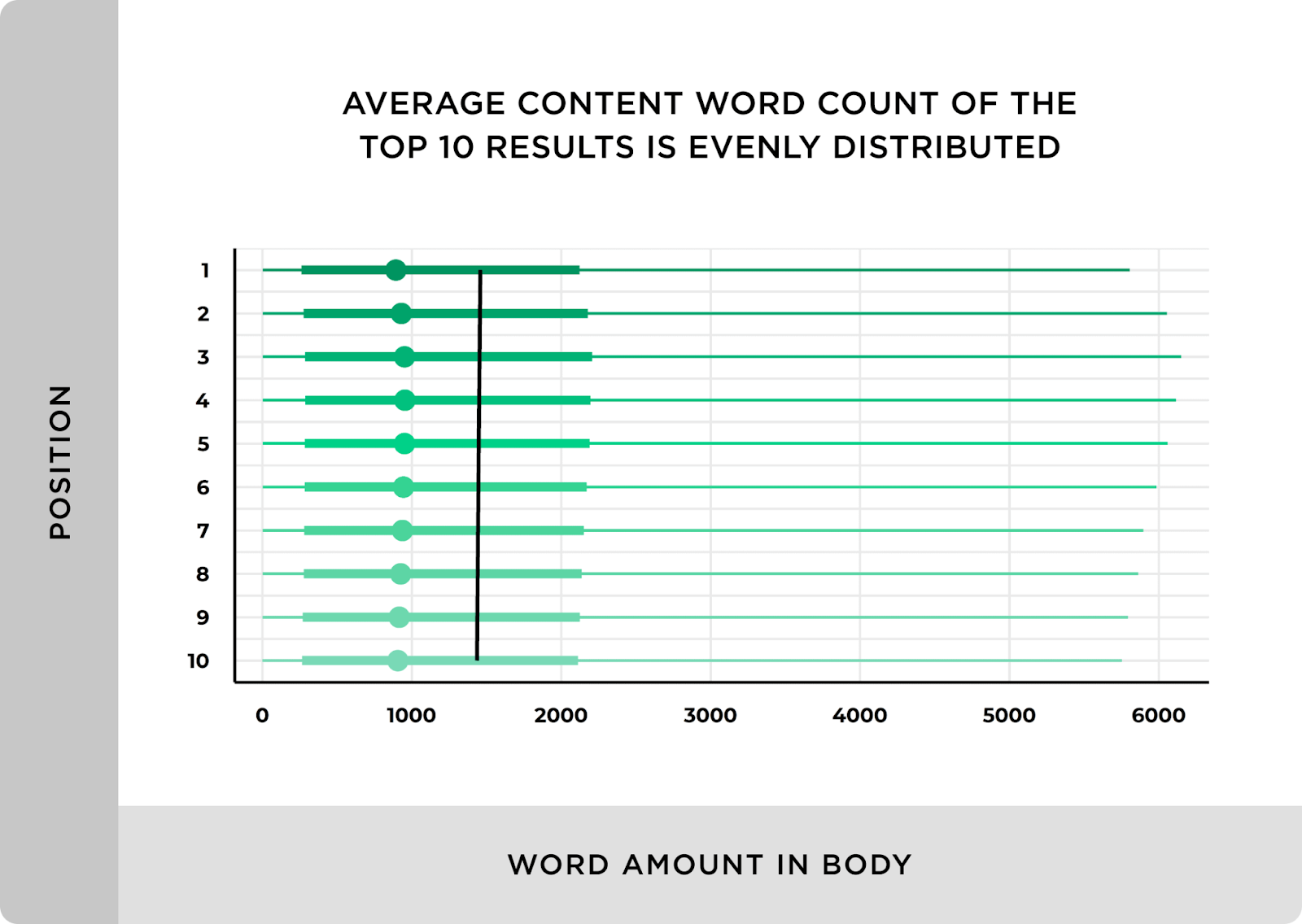
Write content of at least 300 words, longer and more comprehensive if possible. But keep in mind that most of the content on the first page is approximately 1400 words long.
-
Enrich the content with images, videos or infographics.
7. Image Optimization
-
Add alt text (alt tags) for images and use keywords.
-
Increase loading speed by compressing images.
-
Use user-friendly filenames (e.g. seo-guide.jpg).
8. Internal Linking
-
Create links between related pages.
-
This keeps visitors on the site longer and introduces the content structure to search engines.
9. Page Speed Optimization
-
Optimize images, remove unnecessary plugins to increase website speed.
-
Reduce loading times using CDN (Content Delivery Network).
-
Check speed with tools such as Google PageSpeed Insights or GTmetrix.
10. Mobile Compatibility
-
Make sure your site is responsive to mobile devices.
-
Evaluate your site's performance using Google's Mobile-Friendly Testing tool.
11. User Experience (UX)
-
Offer a user-friendly design.
-
Make menu and navigation elements easily accessible.
-
Ensure visitors can quickly find the information they need.
12. Structured Data (Schema Markup)
-
Use structured data to give search engines more information about the content.
-
You can use many structured data such as product on product pages and organization on your home page. You can find structured data suitable for your website at schema.org.
13. Social Sharing Buttons
-
Make your content easily shareable on social media platforms.
-
Social signals (likes, shares) can indirectly contribute to SEO.
14. Avoid Duplicate Content
-
Avoid using the same content on multiple pages.
-
Use canonical tags for duplicate content.
15. Current and Continuous Optimization
-
Regularly update and optimize the content.
-
Renew your content according to new keywords and trends.
How to Do Technical SEO?
Technical SEO covers technical regulations aimed at improving the crawling and indexing of a website by search engines and optimizing the user experience. Here is a detailed guide on how to do technical SEO:
1. Creating and Submitting a Sitemap (XML Sitemap)
-
Create an XML sitemap and submit it to search engines (Google Search Console, Bing Webmaster Tools).
-
This map introduces important pages on your site to search engines.
-
You can use plugins (Yoast SEO, RankMath) or tools to automatically generate the sitemap.
2. Robots.txt File
-
Configure the robots.txt file to direct search engines' crawling and indexing.
-
Make sure you are not blocking important pages from crawling.
Example:
User-agent: *
Disallow: /hidden-chapter/
3. Using SSL Certificate (HTTPS)
-
Install an SSL certificate to secure your website.
-
By switching to the HTTPS protocol, you can protect user data and gain SEO benefits.
4. Mobile Compatibility
-
Make sure your site is responsive to mobile devices.
-
Check your site using Google's Mobile-Friendly Testing tool.
-
To optimize mobile user experience:
-
Touch-friendly buttons
-
Fast loading times
-
Use clear and readable font sizes.
5. Page Speed Optimization
-
Fast loading time is a critical factor for both user experience and SEO. To optimize:
-
Compress large files (for example, compress images with TinyPNG or ShortPixel).
-
Minimize unnecessary JavaScript and CSS files.
-
Load content only when needed, using lazy loading.
-
Use CDN (Content Delivery Network).
6. URL Structure
-
URLs should be short, descriptive and contain keywords.
-
Example: www.ornek.com/teknik-seo-rehberi
-
Avoid Turkish characters and unnecessary parameters.
7. Crawl and Indexing Control
-
Check your site's crawlability using tools like Google Search Console.
-
Detect and fix errors such as 404 (not found) and 500 (server error).
-
Identify orphaned pages and strengthen them with internal links.
8. Canonical Tags
-
Use canonical tags to avoid duplicate content issues.
Example:
9. Provide search engines with more information about your content using Structured Data
-
Provide search engines with more information about your content using Schema Markup.
-
Creates opportunities for featured snippets or rich results.
For example, for products:
{
“@context”: “https://schema.org”,
“@type”: “Product”,
“name”: “SEO Guide”,
“price”: “99.99”,
“currency”: “TRY”
}
10. Managing Broken Links
-
Find and fix broken links with broken link checker tools.
-
Keep your internal links up to date and ensure users are directed to the correct pages.
11. Log Analysis
-
Understand crawling behavior by analyzing server logs.
-
Identify which pages search engines visit more frequently and crawling problems.
12. Redirects
-
Use the correct redirect methods for old or moved pages:
-
301 redirect: For permanently moved pages.
-
302 redirect: For temporary redirects.
13. Using AMP (Accelerated Mobile Pages)
-
Increase mobile page speed by using AMP for news sites or blogs.
-
AMP-optimized pages load faster on mobile devices.
14. Tags and Categories
-
Make content easier to find by keeping the category and tag structure organized.
-
Consider whether tag pages should be indexed to avoid duplicate content.
15. Multimedia Optimization
-
Add subtitles, descriptions and correct tags for videos.
-
Make search engines understand images by using alt text (alt tags) for images.
16. International SEO (If applicable)
-
If you manage a multilingual site, use hreflang tags.
Example:
17. Current and Continuous Monitoring
-
Make regular scans with SEO tools (Ahrefs, SEMrush, Screaming Frog).
-
Solve technical SEO problems quickly by monitoring performance.
By following these steps, you can strengthen the technical infrastructure of your site, rank higher in search engines and increase user experience.
How to Get Off-Site SEO How is it done?
Off-site SEO is the work done to increase the authority of the website and obtain references from other sites. It includes:
-
Backlink Study: It is important to get backlinks from quality and relevant sites. Backlinks show search engines that your site is trustworthy. However, backlinks from low-quality or spam sites can harm your site's ranking.
-
Social Media Shares: Traffic to the website can be increased through social media. Sharing content on social media platforms allows you to reach larger audiences.
-
Influencer Collaborations: Working with influential people in your field can increase site authority. Influencers' recommendations positively affect your organic traffic by increasing the credibility of your brand.
-
Forums and Blog Comments: Promoting your site in relevant forums and blogs can increase the visibility of your website. However, such promotions should not be perceived as spam; It should be done in a way that contributes.
Frequently Asked Questions
-
Why Should SEO Be Done?
SEO ensures that your website ranks higher in search engines and gets organic traffic. This means more visitors and potential customers. SEO also increases brand awareness and helps you stand out from your competitors. -
Is SEO Difficult to Do?
SEO is a process that requires knowledge and patience. Particularly the parts that require technical knowledge may be difficult, but they are very beneficial in the long run. With a correct SEO strategy, you can increase your ranking and reach your target audience more easily. -
How Long Does SEO Work Take?
SEO processes are generally long-term studies. It may take at least 3-6 months to see results, but this process may vary depending on the industry and competition. Success can be achieved in the long term with continuous optimization and analysis.


